EKS’s default service routing spreads traffic across a cluster’s pods randomly, or round-robin. That means requests frequently land on a pod in a different availability zone (AZ), and since AWS VPC charges for cross-AZ data transfer, that traffic pattern translates directly into higher cost and added latency. Topology Aware Routing (TAR), introduced in Kubernetes 1.24, targets exactly this problem: when pods talk to each other, it adjusts network policy to prefer a pod in the same AZ whenever one is available.
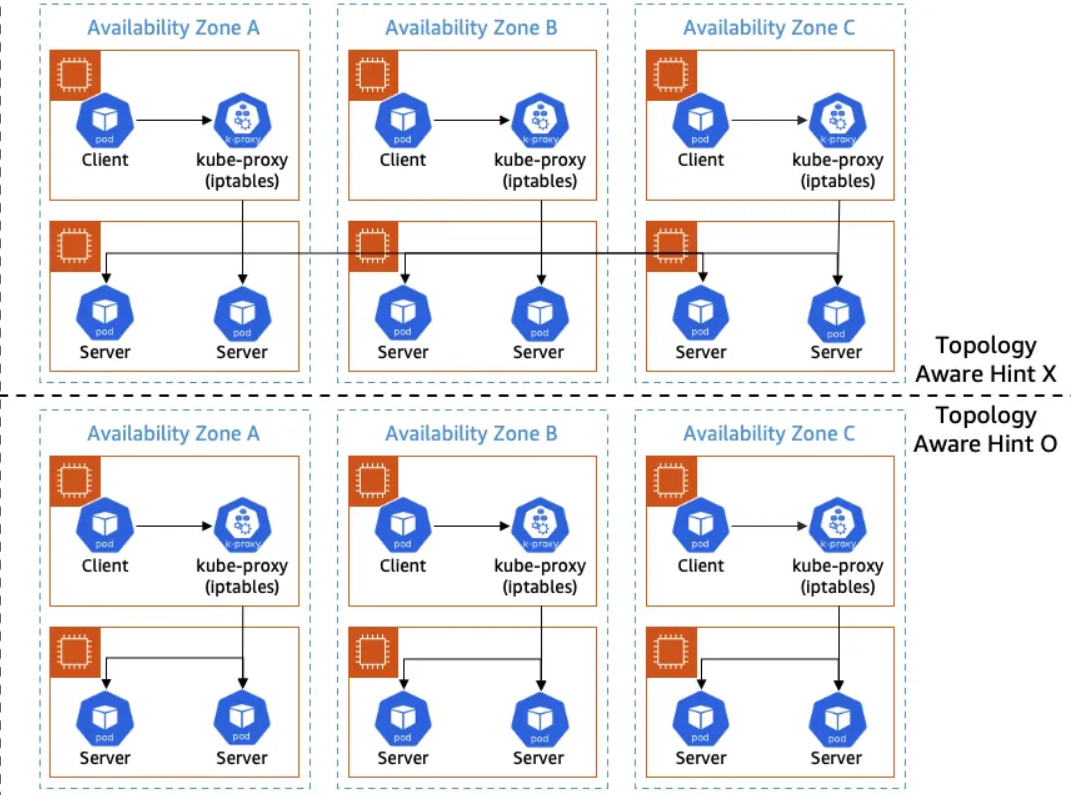
How It Works on EKS
The mechanism itself is simple. When the EndpointSlice Controller adds an endpoint, it records hints based on the pod’s zone. When kube-proxy handles Service traffic, it reads those hints and prefers an endpoint in the same zone. If there aren’t enough usable endpoints in that zone, the default behavior falls back to cross-AZ routing.
A Closer Look
1. Labeling Nodes with Zone Info
Kubernetes attaches region and zone metadata to the machine running each resource, via the topology.kubernetes.io/region and topology.kubernetes.io/zone labels. If you’re running on a managed Kubernetes offering from a cloud provider, this labeling is often handled automatically.
2. EndpointSlice and Hints
TAR’s actual mechanics start with the hints field on the EndpointSlice object. When the EndpointSlice Controller creates an endpoint, it writes a hint matching the zone the pod is in:
apiVersion: discovery.k8s.io/v1
kind: EndpointSlice
metadata:
  name: my-service-abc
  labels:
    kubernetes.io/service-name: my-service
addressType: IPv4
endpoints:
- addresses:
  - 10.0.1.5
  conditions:
    ready: true
  zone: ap-northeast-2a
  hints:
    forZones:
    - name: ap-northeast-2a
- addresses:
  - 10.0.2.8
  conditions:
    ready: true
  zone: ap-northeast-2b
  hints:
    forZones:
    - name: ap-northeast-2b
When routing service traffic, kube-proxy checks these hints and prefers an endpoint in the same zone.
A few terms need explaining here. The EndpointSlice Controller creates and updates EndpointSlices, tracking changes to Service and Pod resources to keep them in sync. An EndpointSlice itself is the list of pod IPs a Service points at. It holds one or more endpoints, each carrying a pod IP, related metadata, and the hints field mentioned above. kube-proxy subscribes to these EndpointSlices and checks hints.forZones to build its routing rules. kube-proxy itself is a daemon running on every worker node, translating a Service’s virtual IP and load balancing into an actual network path, typically using kernel networking facilities like iptables. When Topology Aware Hints are present, it builds routing rules that favor same-zone endpoints.
3. Fallback
If there aren’t enough healthy endpoints in the same zone, kube-proxy routes traffic across zones instead.
How This Relates to the CNI
TAR is closely tied to the CNI. kube-proxy handles distributing traffic from a Service to its pods, building rules that prefer nearby-zone endpoints based on EndpointSlice’s TAR hints. The CNI (Container Network Interface), on the other hand, is the plugin responsible for a pod’s network interface, IP allocation, and routing. Examples include Calico, Cilium, Flannel, and Weave Net.
Most CNIs (Calico, Flannel, and others) use kube-proxy as-is, so TAR works with them without issue. The exception is a CNI like Cilium, which offers its own mode, kube-proxy replacement. Under that mode, kube-proxy itself never gets involved, since routing runs through Cilium’s own algorithm instead, and EndpointSlice hints become meaningless. TAR doesn’t apply. EKS’s default CNI, the Amazon VPC CNI, is kube-proxy-based, so it supports TAR without any issue.
Turning It On
You need an EKS cluster on Kubernetes 1.24 or later, plus one annotation on the Service resource. For versions 1.24 through 1.26, that’s service.kubernetes.io/topology-aware-hints: "auto"; for 1.27 and later, it’s service.kubernetes.io/topology-mode: "Auto".
When TAR Won’t Kick In
A handful of conditions can keep TAR from activating, or from working as expected.
If a zone has fewer endpoints than there are zones total, TAR doesn’t activate at all. The same happens if endpoint distribution across zones is too lopsided. If even a single node is missing the topology.kubernetes.io/zone label, or doesn’t report an allocatable CPU metric, TAR won’t work, and the same is true if even one endpoint in an EndpointSlice lacks a hints.forZones entry.
Environments running a Horizontal Pod Autoscaler (HPA) need extra care. When HPA adds pods, Topology Spread Constraints keep them distributed evenly across zones. But when the Deployment Controller removes pods to scale down, it terminates them randomly, without any regard for zone balance. Repeat that cycle enough times and the imbalance across zones accumulates until TAR eventually turns itself off. Descheduler can help work around that drift. And to keep load balanced from the start, it’s worth pairing TAR with Pod Topology Spread Constraints.
The Core Requirement: Even Pod Distribution Across AZs
The main requirement is an even distribution of pods across AZs. The minimum pod count required per AZ is computed as:
total pod count * (that zone's CPU ratio) * (1/1.2)
Fall short of this and TAR stays off. The constant 1.2 here is hardcoded in the Kubernetes source and isn’t something you can configure.